
Gently set the rhythm
of your day.
olne — a digital companion app for everyday life with Parkinson’s disease


What is olne?
olne is an app for people with Parkinson’s disease and their families.
So you can choose what to do today, yourself.
Core features are free. Available on iPhone and Android.
olne lets you know when it’s time for the things on today’s list, such as medication and exercise, and lets you log medication, how you feel (ON/OFF), and symptoms with a single tap. Your entries come together in a symptom diary you can show your doctor as it is at your appointment. You can also capture tremor and other symptoms on video.
Doctor-supervised reading and a community where you can connect with others living with the same condition are in the same app. olne grew out of joint research with the Department of Neurology, Osaka University Graduate School of Medicine, and is operated by MovoMind, Inc.
Medication waves, symptom waves.
Parkinson’s changes over the course of the day
Parkinson’s symptoms can change over the course of a day. While medication is working, moving is easier; when it wears off, moving gets harder. People with Parkinson’s build each day around these waves.
Some people take medication five to ten times a day. Medication timing, daily rhythm, how body and mind are doing — keeping all of this in order on your own is hard. olne is there beside you, helping to keep things in order.
Medication
Non-motor symptoms that continue around the clock (depression, insomnia, pain, constipation, etc.)
* Symptoms vary from person to person.
We start from “I know what to do, but I can’t always do it.” Medication timing, staying hydrated, light exercise — olne gently suggests what you can do, at the times you’re able to do it.
What olne values
As a digital companion for your daily rhythm, olne values four things.
-
Timing your day
Shows what to do, matched to the time of day.
-
Caring for body and mind
Builds medication, exercise, and nutrition into daily life.
-
Celebrating small wins
Counts the days you did it, without blaming the days you didn’t.
-
Deciding for yourself
What to do, and which habits to keep — you choose.
Not “support,” but everyday “choice.”
Key features
olne helps in three ways: Organize, Learn, and Connect.
Organize: medication, exercise, and how you feel — at the right time
From waking up to bedtime, what you need, timed to your day.

-
Reminders for today’s tasks
From waking up to bedtime, olne shows medication, meals, hydration, exercise, rest, and more for each time of day, and lets you know with notifications.
-
Medication reminders and log
A notification arrives when it’s time for your medication. Tap “Taken,” and it’s saved to your medication log.
-
My routines
Add your own habits, like exercises or hobbies, in your own words, and include them in today’s tasks.
Also
- Exercise content: Delivers videos from the exercise program “PDit” and more as daily cards.
- Impulse awareness notifications: Awareness notifications help you prepare for impulse problems that are hard to talk about (impulse control disorders).
- Adding up what you’ve done: Each “Taken” and “Done” earns points, so you can see the days you kept going.
Organize
What’s hard to get across in the exam room — straight to your doctor.
-
Logging how you feel (ON/OFF) and symptoms
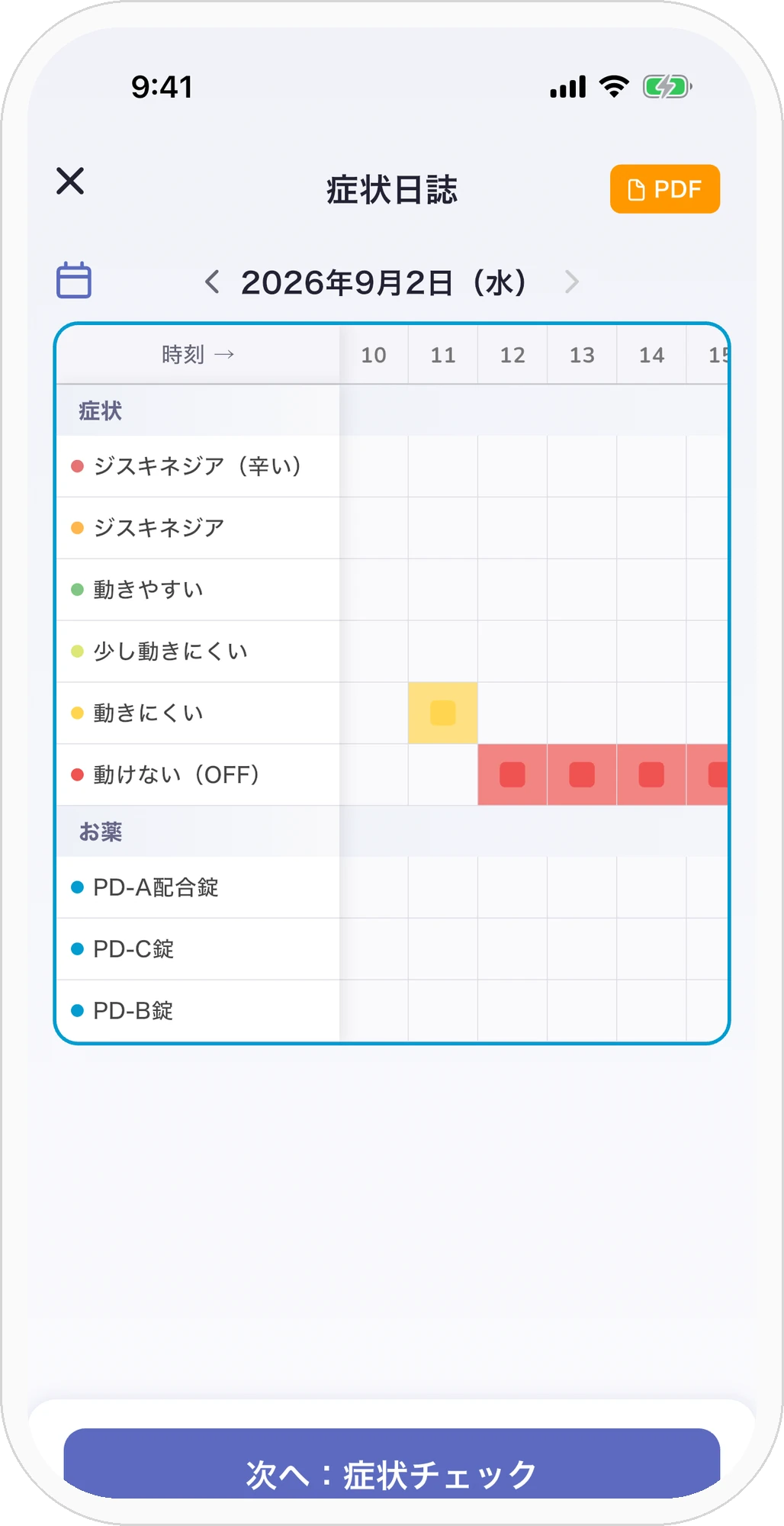
Log “ON” (easier to move) and “OFF” (harder to move) with a single tap. You can also log dyskinesia and symptoms beyond movement — such as a quiet voice, stiffness, constipation, or trouble falling asleep — with the time.
-
Symptom videos
Record tremor or stiffness at home on video, and show it at your appointment as it is.
-
Symptom diary
Brings OFF periods, dyskinesia, medication, sleep, and symptoms beyond movement together in one list by date and time. You can show the screen at your appointment as it is.
Also
- Getting ready for appointments: Add your appointments, and olne reminds you to fill in your symptom diary before each visit. You can also look back on your quality of life and how well your medication is working.
- Steps and sleep: Your steps and sleep are recorded without you doing anything.
For when you wonder, “How do other people manage?”
Learn: doctor-supervised basics and personal stories
-
Parkinson’s basics
Explains symptoms, treatment, living with medication, and more, under the supervision of a neurologist.
-
Stories and series
Brings you the voices of people living with the same condition, their families, and healthcare professionals.
-
News and helpful information
Shares news about Parkinson’s disease and information such as products that make daily life easier.
+ Local support information: You can also look up specialist facilities in your area.
Connect: with others who have the same condition
-
Groups
Join groups such as patient associations and exercise groups to receive announcements and start topics. Some groups are members-only and require approval.
-
Messages
Become friends with people you follow and message one-on-one. With your “Torisetsu” (a short guide to you), you can let others know about yourself ahead of time.
-
Stamps
Send stamps for different moments, like “OFF right now” or “Thank you,” with a single tap. Even when tremor makes typing hard, your feelings get through.
Who olne is for
- People recently diagnosed with Parkinson’s who want to know what to do first
- People who take medication many times a day and worry about missed doses or taking them at the wrong time
- People who want to track the waves of their medication’s effect (ON/OFF) and share them with their doctor
- People who couldn’t keep up with a paper symptom diary
- People who want to learn from the tips and experiences of others with the same condition, or who want someone to talk to
- People who want to show their doctor their tremor or stiffness on video
How to use olne
Download it for free from the App Store or Google Play.
Set your medication times and your daily routines.
When a notification arrives, tap “Taken” or “Done.” Log how you feel as ON/OFF.
At your appointment, show your doctor the symptom diary screen as it is.
Frequently asked questions
Does it cost anything?
Core features are free to use.
Can I use it on both iPhone and Android?
Yes. Download it from the App Store for iPhone, or from Google Play for Android.
How do I show my records to my doctor?
Show the symptom diary screen at your appointment as it is. It lists OFF periods, medication, sleep, and symptoms beyond movement. You can also record tremor and other symptoms on video. PDF export is coming soon.
Can my family use it?
Family members can read articles written for families (such as “What families should know”). Features that let family members keep an eye on things or log on your behalf are in development. A feature that puts your records into a PDF to give to your family is also coming soon.
My hands shake, and typing is hard.
Daily logging centers on single taps: “Taken,” “Done,” and “ON/OFF.” In the community, you can also send stamps with a single tap.
How is olne different from other Parkinson’s apps?
olne isn’t just an app for logging medication and symptoms. Reminders for what to do at each time of day, doctor-supervised reading, and a community to connect with others are all in one place.
Who makes olne?
MovoMind, Inc. develops and operates olne. It began as joint research with the Department of Neurology, Osaka University Graduate School of Medicine, and Dr. Kensuke Ikenaka of that department provides medical supervision.
How is my data handled?
We handle your data in accordance with our privacy policy. For details, see our Privacy Policy.
olne's manifesto
Built with you.
Features you’d like, places that are hard to use, things you happen to notice — please tell us.
The one who moves olne forward is you, living with Parkinson’s.
Medical supervision

MEDICAL ADVISOR
Kensuke Ikenaka
Department of Neurology, Osaka University Graduate School of Medicine
A neurologist at the forefront of Parkinson’s disease clinical care and research. As MovoMind’s Medical Advisor, supervises the medical validity of the product and advances joint research.
olne, growing with you.

Family members can also scan it with their own smartphone.
Please note
- olne is an app for everyday self-care and record-keeping. It does not diagnose or treat any disease.
- The symptom diary is a summary of your own records. It is not the result of a test or assessment.
- Always talk to your doctor about changes to the dose or timing of your medication, and about your treatment plan.
- Articles are provided for information only. They are not a substitute for medical advice, diagnosis, or treatment.